Wednesday, March 22, 2017


Blog Post 8: 


What are the components of the writing process?
  • The components of the writing process are prewriting, writing, revision, editing, and publishing.

  What are some difficulties students with disabilities have in writing?
  • Some difficulties that students with disabilities might have in writing are difficulty recognizing and writing words,  slow writing speed, poor spelling and handwriting, fine motor problems, and writing fluency.

What is one technology tool to assist students with the writing process?
Please describe the tool, suggest ways to implement in the classroom, and link to a resource on the tool. Make sure to include pictures.
  • One technology tool is an alternative keyboard. This is beneficial to a student whom may have LD or trouble typing. This tool will reduces input choices, groups keys by color/location, and adds graphics to aid comprehension. These type of keyboards have special overlays that customize the appearance and function of a standard keyboard. This tool is easy for a student to access within the classroom and does not need the teacher assistance.

Blog Post #7: Math


What are some common areas that students struggle with in mathematics?
  • Some common areas that students struggle with in math are understanding math concepts, steps to solving problems, reading the problem and the notation, understanding the language and vocabulary, cannot identify and organize the steps to start and finish the problem, and aligning numbers and forming shapes. To help find a solution to helping the students, the teacher can use a range of low to high tech tools such as manipulatives, talking calculator, and voice recognition math software. 
  •   


Choose a math AT tool. Describe the tool. Who is this tool appropriate for (what kinds of disabilities:)?) How would you implement in the classroom? What are some resources for this tool?
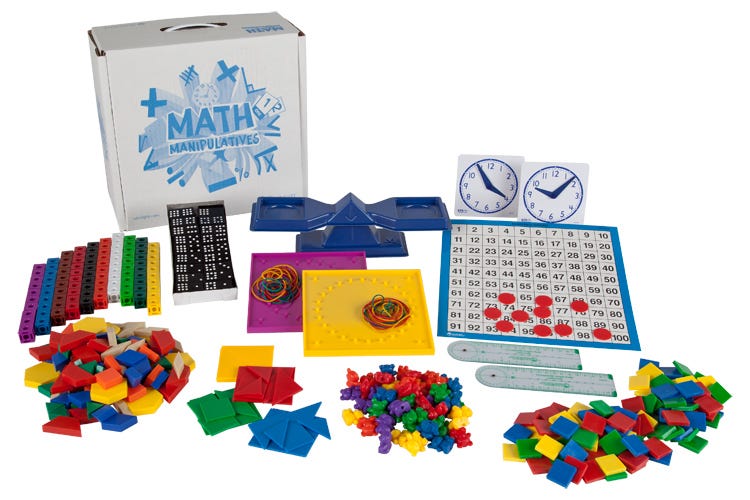
  • As a teacher, there are many math AT tool that can be used within the classroom. The teacher can use different math apps or websites to be incorporated into the classroom to help assist students. One low tech tool that is very useful are manipulatives. I remember all throughout my elementary school experience, my teachers would have different manipulatives that we can use in the classroom if we needed extra assistance. Manipulatives are not just for students with disabilities. They can be used to help assist anyone having trouble in math and learning a particular skill. Such tools as manipulatives are a good hands on activity. Students are able to touch them and use them in anyway needed to help assist. Manipulatives can be hands on or virtual on the computer. Either way, this is a great tool for teachers to  have access to within the classroom.   
  •  


Blog Post #6:

  •   How can technology facilitate communication?
    • Technology can facilitate communication by having the student receive hearing assistive technology. Some examples of this are alerting devices, amplified telephones, TTY/TDD devices, relay service/video relay, pocket speak-and-read portable VCO, and text messaging. The teacher must know and understand the different tools the student might be using and how to apply that within the classroom. The book explains many different tools that the students can access to make it easier for their learning environment. Whether it is an app on the iPad, a speech to text tool, or a website to use, there are many ways to help assist the students and their different needs.    
  • How can UDL be applied in teaching students who are   deaf and blind?
    • Within a classroom, UDL can be applied in teaching students who are deaf and blind in many ways. For some students, they have trouble following lectures, talking with their peers and teachers, and communicating over the phone. Alerting devices and assistive listening devices can be used to help assist with the student. The school can provide tools for the student as well as the parents themselves.
  •   List one AT tool for working with students with sensory impairments. Include a resource, photo, and one way you would implement in the classroom.
    • There are many tools that a student can use if they have sensory impairments. An example of this are computer software and hardware, such as voice recognition programs, screen readers, and screen enlargement applications. To implement this into my classroom, a student with a sensory impairment will have an easier time using the computer with a software that will enhance the words and pictures on the screen. One computer program that I found I called "Dragon Naturally Speaking." This is a speech recognition software that the student can use. The student can use this software on their own to complete an assignment or while the teacher is speaking. It is easy to access for the student and can be used anytime.

    •